What it helps you answer
- What does each product really cost to make, once ingredients, packaging, your time, overhead and waste are counted?
- What should I charge to reach my target margin?
- Which products are on target, which are underpriced, and which are losing money?
- How much am I really earning for each hour of work?
- How many sales, and how many hours, would it take to reach my monthly profit goal?
A look at the dashboard
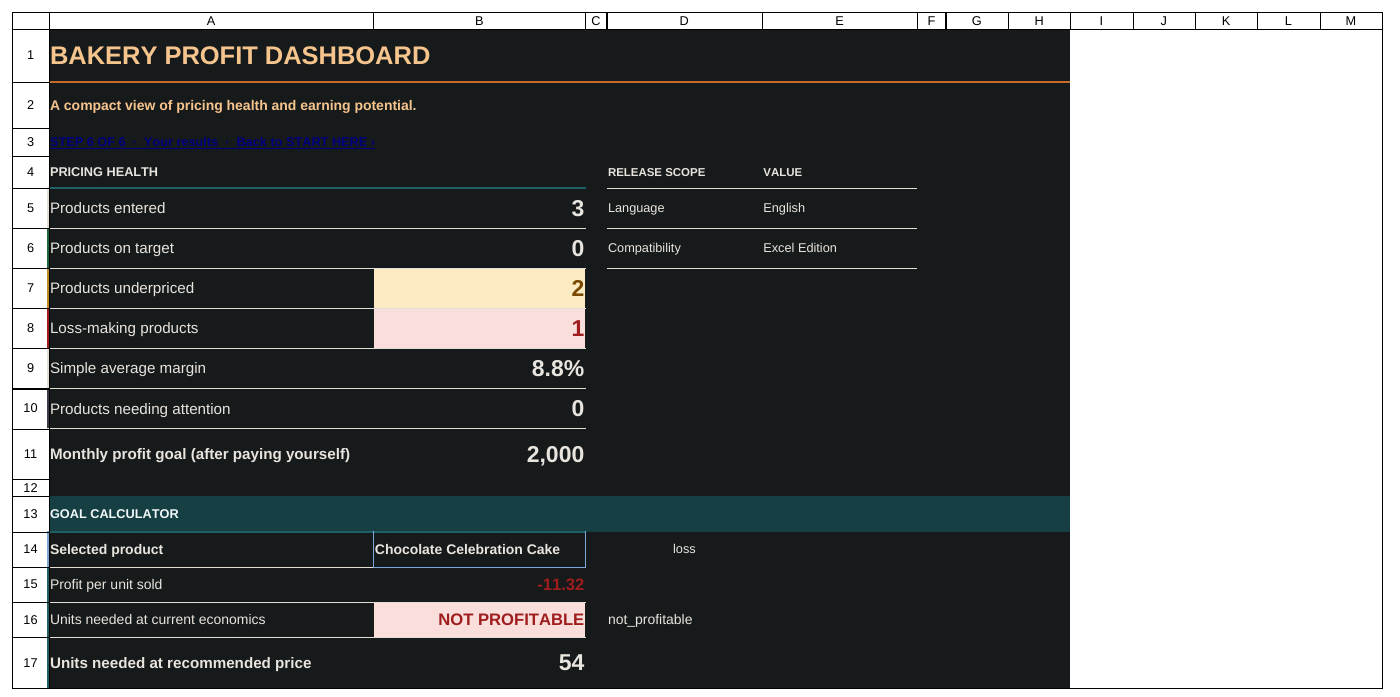
How it works
- Set your numbersEnter your target margin, hourly rate, overhead, waste allowance and any selling fees.
- Add your ingredientsType what you paid and the pack size, in the units you buy them in.
- Build your recipesList what goes into each recipe, using the ingredients you added.
- Turn recipes into productsAdd the yield, packaging, hours of work and your current selling price.
- Read the resultsEach product gets a status: on target, underpriced or loss. Use the pricing lab to test a discount or a change in ingredient costs.
What is in the workbook
All four editions have the same eight sheets.
- Start here
- A five-minute quick start and your settings.
- Ingredients
- What you pay for each ingredient, and the cost per gram, millilitre or piece.
- Recipes
- What goes into each recipe, and what each recipe costs.
- Products
- What you sell, with its true cost, current price and profit.
- Pricing lab
- Try a discount, a cost change or a different margin and see the effect.
- Profit lab
- Compare products by profit, margin, break-even price and earnings per hour.
- Dashboard
- The overall picture, plus how many sales and hours your monthly goal would take.
- Read me
- What the workbook is for, its limits and how to use it safely.
Units and currency
- Weight
- g, kg, oz, lb
- Volume
- ml, L, tsp, tbsp, cup, fl oz
- Count
- piece
- Converting
- Weight to volume needs the ingredient's density. Pieces do not convert to weight or volume.
- Currency
- Any. Amounts are plain numbers in the currency you choose.
Compatibility and limits
- Excel editions tested with desktop Excel for Mac 16.111.1. Google Sheets editions tested in Google Sheets on desktop Chrome. Windows Excel, Excel on the web or mobile, the Google Sheets phone and tablet apps, Numbers and LibreOffice have not been tested. Microsoft Excel is not included; Google Sheets needs a free Google account.
- Workbook labels in English, Spanish and French, chosen on the Start here sheet. The quick-start guide is in English. There is no Arabic edition, and some longer Spanish and French labels wrap or are cut off.
- Holds up to 100 ingredients, 200 recipe lines and 100 products.
- The editions do not sync with each other, and the workbook does not convert currencies.
- Sample products and figures, including loss-making examples, show how it works. Replace them with your own. Results depend on your inputs; no profit is guaranteed.
- Your settings and figures go in clearly marked input cells. The calculations are protected so they cannot be overwritten by accident.
- No macros, add-ins or internet connection needed.
- A decision-support tool, not accounting, tax or legal advice. Check local taxes, food-business rules and payment or marketplace fees separately.
Buying, licence and refunds
A one-time digital purchase through Gumroad, with no subscription. After checkout you download one ZIP file with both Excel editions, an English quick-start, release notes, support instructions, the licence and file checksums. Your Gumroad purchase page also has two "make a copy" links that put your own Google Sheets Light and Dark copies in your Google Drive. Keep your Gumroad receipt link to download again. Founding-customer pricing applies to early buyers; the current price, plus any tax, is shown at checkout.
Licence: one purchase covers all four editions for internal use by one bakery business and its employees. Do not share, resell or redistribute the files or copy links. Customers among the first 500 paid copies get version 1.x improvements to the Excel and Google Sheets editions, when released, through their original purchase; no update schedule is promised. Web app and version 2 releases are separate.
30-day money-back guarantee: email hadi@probehaven.com within 30 days with your Gumroad receipt or order details; no proof of a defect is needed. Refunds are processed through Gumroad, and a full refund ends the licence and future updates. Your statutory consumer rights are not affected.
Need help? See spreadsheet support or use the contact form.
Questions about Home Bakery Profit System
Can I buy it now?
Yes. It is on sale through Gumroad: buy Home Bakery Profit System (Gumroad checkout). The current price is shown at checkout.
Will it work in Google Sheets?
Yes. Your purchase includes native Google Sheets editions, Light and Dark. After checkout, open the links on your Gumroad purchase page and choose Make a copy; the copy is yours and does not change anyone else's file. Use Google Sheets on a computer; the phone and tablet apps have not been verified. The Excel files themselves have not been tested in Google Sheets.
Do I need to be good at spreadsheets?
No. You type into clearly marked input cells, and a quick-start guide is on the first sheet. The calculations are protected, so you cannot break them by accident.
Is it accounting software?
No. It is a decision-support tool for costing and pricing, not accounting, tax or legal advice.
Which currency does it use?
Whichever you choose. Amounts are plain numbers in your own currency.